
Creating and Working with OLAP Slices in PowerExcel Personal
Creating and Working with PowerExcel Slices
Once a PowerExcel Personal Model (a.k.a. “Nexus database”) has been created, the full use and power of the product becomes evident when a user creates an Excel “Slice” of data in the model.
Establishing the PowerExcel Connection
- Launch the Excel application and go to the PowerExcel Tab along the Excel ribbon.
- Create a Connection to the model (highlighted icon below):
In the PowerExcel Connections section, click the Connections icon
- In the dialog that appears, click New

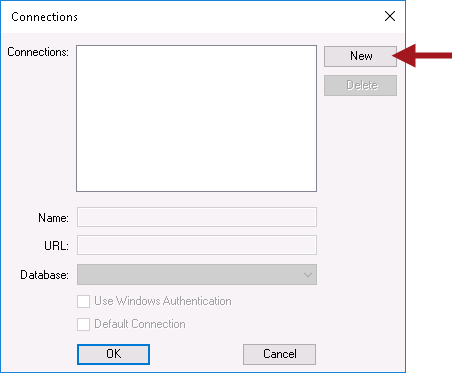
- In the Name field, provide any name for the connection. Something that identifies the data source would be best.
- In the URL field, enter “localhost” as required for the PowerExcel Personal Studio.
Note: The PowerExcel Personal version used in this training is a standalone, local database. It lives on your machine and is meant for a single user. In multi-user instances, like on a Finance team in a corporation, you would enter a private, secure IP Address to reach a cloud-based server, like those provided to PARIS Technologies clients.
- Click on the Database drop-down and select the “localhost” source PowerExcel Personal database.
- Click OK.
- The PowerExcel connection is now successfully created!
Now that you have a connection, You can make your first slice! 💪
Creating a PowerExcel Slice
To create a Slice from the database you just created:
- On the PowerExcel toolbar, select New
- In the PowerExcel sidebar at right, select a Database and a Cube
- You can now select Filters: Columns, and Rows by double-clicking on the Dimensions shown.
Follow the video to see exactly how to make selections for the slice, and then test it out in your software.
Are you able to establish a new PowerExcel Personal connection?
Are you able to make a Slice?
If so, you are ready to move on to the next module!
Cheers!